1
Open or scan
Choose an existing PDF or create a new one with the built-in scanner.
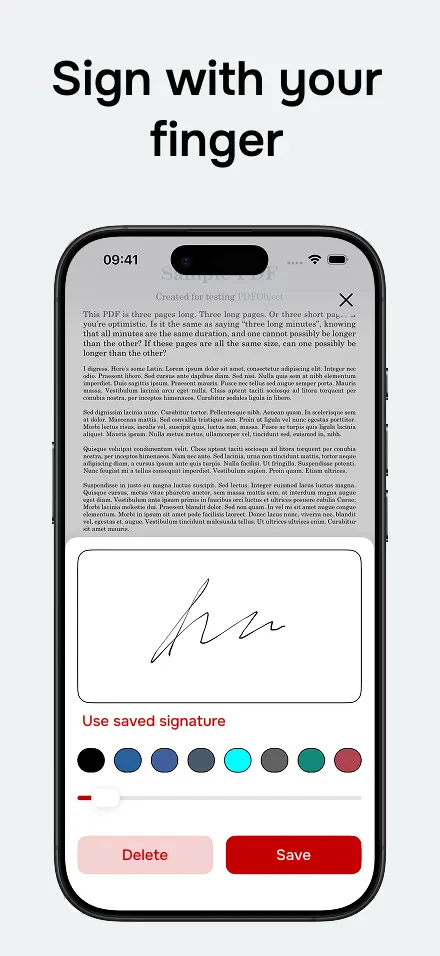
Draw your signature, save it and place it precisely on any page.
Turn paper documents into clean PDFs using your phone camera.
Fill quick details, add today's date and resize everything before saving.
Reopen recently used or signed PDFs without searching through folders.
Export the final PDF to your device or share it through Mail, WhatsApp, Drive and more.
Your files and signatures are processed on your device, with no required cloud upload.
Choose an existing PDF or create a new one with the built-in scanner.
Add a signature, text or date exactly where you need it.
Export the final PDF and send it through your preferred app.
Sign documents from email without printing or opening your computer.
Add name, date, comments or short details directly onto the PDF.
Scan a page, turn it into a PDF and share it ready to send.
Available for iPhone and Android. Open, scan, sign, fill and share PDFs without friction.


Sign PDF documents for free on iPhone and Android. Draw your signature, place it on the document and save or share the final PDF.
Scan paper documents, turn them into PDFs and add a signature, text or date before sharing.
Fill simple PDFs on iPhone and Android by adding text, date and signature before saving or sharing.
Finally an app that just works! I signed and sent an important document in under a minute. Clean, simple, and fast.
Love it! Saving and reusing signatures makes my life so much easier. Highly recommended for professionals.
Super intuitive and easy to use. Signed a PDF from my email and shared it right away. Great for quick tasks.
The best PDF signing app I’ve tried. No unnecessary permissions, no data tracking. 10/10 for privacy.
The app works on all mobile devices running iOS (iPhone) and Android.
Yes. You can download the app for free and sign, save and share documents from your phone.
Yes. The app includes a scanner to create PDFs from paper documents and continue editing them.
Yes. You can place text, dates and signatures on the PDF before exporting it.
No. Everything is processed locally. The app never uploads or shares your files or signatures.